Posts

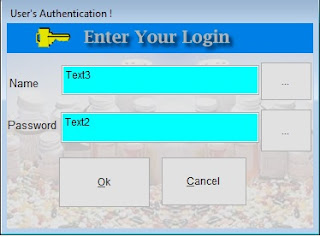
Touchscreen For Restaurant Project (Login Form)
Image
Today i wanna share how to make a touchscreen using Visual Foxpro Here The Code : ************************************************** *-- Form:         form1 (alpha_key.scx) *-- ParentClass:  form *-- BaseClass:    form *-- Time Stamp:   08/11/15 08:41:06 AM * DEFINE CLASS form1 AS form Height = 238 Width = 675 ShowWindow = 1 DoCreate = .T. AutoCenter = .T. BorderStyle = 3 Caption = "Form1" TitleBar = 0 Name = "Form1" ADD OBJECT command1 AS commandbutton WITH ; Top = 62, ; Left = 1, ; Height = 55, ; Width = 62, ; FontBold = .T., ; FontSize = 16, ; Anchor = 240, ; WordWrap = .T., ; Caption = "Q", ; TabStop = .F., ; Alignment = 2, ; Name = "Command1" ADD OBJECT command2 AS commandbutton WITH ; Top = 62, ; Left = 62, ; Height = 55, ; Width = 62, ; FontBold = .T., ; FontSize = 16, ; Anchor = 240, ; WordWrap = .T., ; Cap...
Publish o_drawer.prn to Open Cash Drawer Instanly without coding.

Many People Ask Me how to open Cash Drawer without Coding. Today i Share file o_drawer.prn to public Download Link : http://adf.ly/wthpq password rar : http://all-comp.blogspot.com/ How to use it ? Sample Code : ---------------------------------------- COPY FILE O_DRAWER.PRN TO LPT1.DOS ---------------------------------------- Thanks Enjoyit
Image
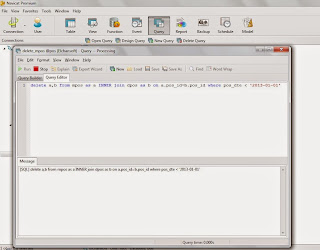
Hi All How Are You Today Today i want tell you How delete Master-Detail Table in Navicat This is a Simple syntax in your Navicat Query for Delete Relation Table This syntax will delete relation table mpos and dpos Date Less than 2013-01-01 If you like it you can add syntax for filter delete option. I Hope you enjoyit

Access Denied from Xp to win 7 64 bit Shared Folder

access denied and account disable when access win 7 64 bit folder from Windows XP Here The Solutions Create Standard User from win 7 64 bit and name computer has "mserver" example : user - myprog Type simple Password for user Myprog examples : 123456 Create Folder Name examples : myvfp and shared for everyone and full control access. After that DONE In windows XP type Name or Server \\mserver (your computer name) If appear windows Logon Type user : myprog and Password :123456 and you can meat folder myvfp (vfp folder) If not than your Windows XP have some Problem has say : account disable or something error access denied ..... Click Start Run .... type : control userpasswords2 goto Advanced - and Click - Manage Password Click Add Type Name of Server : mserver username : myprog password : 123456 Restart your Computer and DONE Enjoy... Send me email if you have some problem at elchan99@gmail.com Thanks for your attentions

Cross Table Update with MySQL

Using MySQL version 4.0 or higher you can update a table by joining two or more tables together; note that the examples shown in this article are not possible with MySQL 3.23 or earlier. By joining two tables together you can update one table based on fields in associated records in another table. Let's say for example you have a product table which stores information about products and a productPrice table which has pricing information and you want to update the prices based on when the product was created (in the examples below you want to discount all your older stuff to 80% of the current price). In MySQL you can do this in one of two ways. The first is do do a join using commas, like so: UPDATE product p, productPrice pp SET pp.price = pp.price * 0.8 WHERE p.productId = pp.productId AND p.dateCreated The second way is to use inner join syntax as shown below. This syntax is slightly more flexible as it means you can use left and right joins as well as inner joins, whereas t...

Alias Table Not Found

IF you call multiform adding for new record you must change the form to 2 - private data session if you don't you can meat error appear 'alias table not found'

How To Open Cash Drawer Without Coding.... (New)

Dear all Foxer today i want to sharing my file o.drawer.prn that can open drawer without any coding instantly All you have to do just put this code into your object ---------------------------------------- COPY FILE O_DRAWER.PRN TO LPT1.DOS ---------------------------------------- Enjoy.... If you need file o.drawer.prn please contact me via email at : elchan99@gmail.com Best Regard

How to Add Object button in VFP _Screen Desktop

Image
Public oHandler oHandler = Newobject ("ClickHandler") WITH _SCREEN _SCREEN.Caption='SHOW BUTTON IN VFP DESKTOP SCREEN' .ADDOBJECT("command1","commandbutton") Bindevent (.COMMAND1, "Click", oHandler, "Build") WITH .COMMAND1 .Top = 80 .Left = 10 .Height = 48 .Width = 228 .FontBold = .T. .FontSize = 12 .Caption = "SHOW BUTTON 1" .SpecialEffect = 0 .BackColor = RGB(255,88,9) .Themes = .T. .Name = "Command1" .VISIBLE=.T. ENDWITH .ADDOBJECT("command2","commandbutton") Bindevent (.COMMAND2, "Click", oHandler, "Build1") WITH .COMMAND2 .Top = 150 .Left = 10 .Height = 48 .Width = 228 .FontBold = .T. .FontSize = 12 .Caption = "SHOW BUTTON 2" .SpecialEffect = 0 .BackColor = RGB(255,88,9) .Themes = .T. .Name = "Command2" .VISIBLE=.T. ENDWITH ENDWITH *---------------------------------------- Define Class...

How to Recovery MySQL database if you only have Folder Frm, Ibdata1, ib_logfile0, ib_logfile1

Are you have trouble to open database MySQL here i will show you in 4 step : 1. First Backup your database folder make sure you have 3 file and 1 folder frm(database name) or 2 folder or have more folder frm backup all (remember) - ibdata1 - ib_logfile0 - ib_logfile1 - Folder database frm 2. see what trouble you have - Access denied for user 'root'@'localhost'(using password:YES) if you try and try reinstall mysql but security not apply answer: - delete folder mysql in folder data - reinstall mysql - copy all folder frm and 3 file ibdata1,ib_logfile0,ib_logfile1 3. you should try to open database, and if you can open your database enjoy. 4. If you still can't open your database please send me email elchansoft88@gmail.com i will help you as soon as possible

Turn on MySQL query cache to speed up query performance?

As we know, speed is always the most important element in developing a website especially for those high traffic database driven website. You can try to turn on query cache to speed up query. To speed up query, enable the MySQL query cache, before that you need to set few variables in mysql configuration file (usually is my.cnf or my.ini) - 1st, set query_cache_type to 1. (There are 3 possible settings: 0 (disable / off), 1 (enable / on) and 2 (on demand). query_cache_type = 1 - 2nd, set query_cache_size to your expected size. I’d prefer to set it at 20MB. query_cache_size = 20M If you set your query_cache_type = 2 ( on demand ), you would wan to modify your sql query to support cache. SELECT SQL_CACHE field1, field2 FROM table1 WHERE field3 = ‘yes’ To check if your mysql server already enable query cache, simply run this query:- SHOW VARIABLES LIKE ‘%query_cache%’; You will see this result:- +——————-+————————————————————————+ | Variable_name | Value | +——————-+———————————————...

How to Create MySQL Store Procedure in Navicat

Example: BEGIN SELECT * FROM CITY WHERE CITY_NME=NAME; END Save Store Procedure with TEST name ***** In Paramter Textbox fill with NAME CHAR(20) click run an entry "BATAM" or what ever CITY name the query should be display with city fill **************** now how to call within VFP **************** Here an example: MYSTS = "CALL TEST('BATAM')" SQLEXEC(1, MYSTS, "MYCURSOR") SELECT MYCURSOR BROWSE

Installing IIS - Cannot find STAXMEM.DL_

Ahhh, IIS, gotta love it. Nothing can ever be easy. So, as I am trying to install IIS on my Dell that I just reformatted, I get this: Cannot find the file STAXMEM.DL_ in my C:\i386 dir. hmm…. well, after a little looking, if you run this command esentutl /p %windir%\security\database\secedit.sdb If you then retry the install, it should work

Fix Generic Host For Win32 and Svchost.exe Error

Now we no longer have to worry about “Generic Host for Win32 Process” and “svchost.exe” errors that haunt our Windows XP almost daily (If not cured). Below i will explain what are the symptoms of this evil problem and how easily it can be fixed: Symptoms: You are surfing the internet or are engaged any type of Internet activity when suddenly all your Network activity goes to hault. You can still see the Internet connected icon in the tray but you cannot surf, browse or do anything. You get an error message something like “Generic Host Process for Win32 Services has encountered a problem and needs to close. We are sorry for the inconvenience.” Error message reporting about faulting netapi32.dll and svchost.exe. You try to disconnect your Internet because of no activity observed but the Internet icon wont disappear. You recieve an error message something like “Your PC has recovered from a serious problem” etc. Solution: Follow these simple steps and your Windows will be fully cured of t...

How to Change MySQL Default Data Folder to another Folder

Today a client wanted to move his MySQL database to second hard disk. Moving MySQL database to its own hard disk improve IO performance as the hard disk only need to serve MySQL data, nothing OS related. This was a cpanel server, so start with stoping chkservd, so mysql or httpd will not start while i copy the files. First created a copy of MySQL database on second hard disk, which is mounted as /backup rsync -vrplogDtH /var/lib/mysql /backup/ Now stop chkservd, mysql and apache service chkservd stop service mysql stop service httpd stop Wait few minutes and run rsync again to update the database rsync -vrplogDtH /var/lib/mysql /backup/ We have now MySQL database copied to /backup/mysql folder. Rename orginal MySQL data files with mv /var/lib/mysql /var/lib/mysql_old Now edit /etc/my.cnf vi /etc/my.cnf You need to add following line datadir = /backup/mysql To start of the file. If datadir already set, you need to change path. Everything is finished, just restart mysql, apache and check...

(VFP) - Amazing VFP Studio Code Editor in Visual Studio 2008

Since posting the countdown, I've been fielding lots of questions regarding VFP Studio. Some of the mystery surrounding VFP Studio has been on purpose and some of it has been because we (Bo Durban and I) are not yet sure what all is possible working within the framework provided by Microsoft via the Visual Studio Isolated Shell. However, in order to provide a little more transparency and begin the process of getting feedback from the community I will be presenting a series of screencasts in the next few months. Here I present the first screencast in the series on VFP Studio's Code Editor. VFP Studio's Code Editor, which is made possible via a Language Service Bo Durban and I created in Visual Studio 2008, provides some significant enhancements when compared to the editor included in VFP 9.0 including outlining, Quick Info, Intellisense for user-defined classes, line numbers, word wrap, VS-style navigation bar, improved Code Snippets and various other features we are impleme...

XP - The Sharing tab is not visible. (Gone From Tab Menu)

Use the Services snap-in to start the Server service. To do this, follow these steps: 1.Click Start, and then click Control Panel. 2.Click Performance and Maintenance, click Administrative Tools, expand Services and Applications, and then double-click Services. 3.Right-click the Server service, and then click Start. 4.Restart Computer •The folder is already shared. Click New Share, and then type the new share name. •You want to hide the shared folder. To hide the shared folder, type $ as the last character of the share name. Other users cannot see this shared folder when they search by using My Computer or Windows Explorer, but they can map to the shared folder.

Status XP "Cannot find \\computername or \\computername is not accessible"

Solutions Click Start - Run - services.msc Search Workstation double click Workstation change Automatic process and apply them restart computer and you done...

Status XP "acquiring network address"

dude.... acquiring network address is basicaly translated to an ip address 0.0.0.0, if a winxp does not have the sp2 it will just say invalid ip and the ip is 0.0.0.0 here is the procedure to correct this click on start, run, services.msc look for DHCP client.... if it sess acquiring network address that means that the dhcp client is DISABLED OR STOPTED... highlight the DHCP client and on the left side you will see "START" the service, click on it and then it will say "STOP, RESTART" then double click on the service and on the startup type select automatic, apply by the way.. also chk the tcp/ip properties, make sure that we have all to automatic

How to Handle - Error Access Denied for Sql server

When to create ODBC connection using sql server appear access denied (08001) In Client: Step I Name : 'xxx' Description : 'xxxxxxxxxx' server : 'mynameserver' Step II Click With SQL Server authentication Click Connect to SQL Server Fill Login ID : Fill Password : Step III - Click Client Configuration Button - Choose TCP/IP - Remove or Uncheck choice in Dynamically determice port Follow next step and Finish Test Connection (Is must Success)

How to Change MSDE 'sa' password

Change your MSSQL Server or MSDE password for 'sa' login C:\osql -U sa 1>sp_password NULL,'new_password','sa' 2>go 3>quit